How to Stop Online Tracking is one of the most searched privacy questions, yet it is also one of the most misunderstood. Many guides promise complete anonymity using a single tool or setting, but real-world privacy protection is more nuanced than that.
Online tracking operates through multiple layers, which means effective reduction requires a combination of tools, habits, and realistic expectations. The goal is not to disappear from the internet, but to minimize unnecessary data collection and long-term profiling.
This article focuses on practical, achievable steps that actually reduce tracking exposure without breaking everyday internet use.
Quick Navigation
Start With Browser-Level Changes
Browsers are a primary tracking surface. Choosing a privacy-focused browser or adjusting privacy settings can immediately reduce exposure.
Blocking third-party cookies, limiting cross-site tracking, and disabling unnecessary browser features all reduce passive data collection. These steps address common tracking methods explained in: How Websites Track You
Limit Account-Based Tracking
Staying logged into accounts across browsing sessions increases tracking accuracy. Logging out of accounts when not needed reduces the ability to link activity across sites.
Using separate browsers or profiles for logged-in and casual browsing can significantly reduce cross-platform tracking.
For context on how accounts affect tracking, see: Digital Privacy and Online Tracking: How You’re Tracked Online and How to Protect Yourself
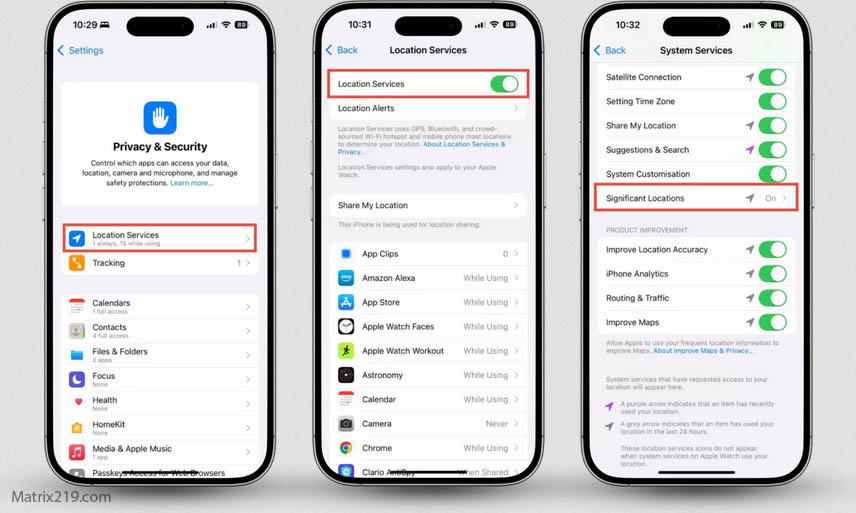
Review App Permissions Regularly
Apps often collect more data than necessary. Reviewing permissions and removing access that is not essential reduces background tracking.
This is especially important for location, contacts, and background network access. App-level tracking methods are discussed in detail here: How Apps Track You
How to Stop Online Tracking
Reduce Device-Level Identifiers
Advertising identifiers and system-level IDs allow long-term recognition. Resetting these identifiers periodically can reduce persistent tracking.
While this does not eliminate tracking, it disrupts long-term profiling and makes data correlation more difficult.
Be Selective With Free Services
Many free services rely on extensive data collection for revenue. Choosing paid or privacy-respecting alternatives can significantly reduce tracking exposure.
Understanding who benefits from data collection helps users make better decisions, as explained in: Who Collects Your Data Online
Understand the Limits of Privacy Tools
VPNs, ad blockers, and private browsing modes each address specific tracking layers. None provide complete protection on their own.
Using these tools together, combined with informed behavior, produces better results than relying on any single solution.
Build Sustainable Privacy Habits
Privacy protection is ongoing. Periodic reviews of browser settings, app permissions, and account activity help maintain reduced exposure over time.
Small, consistent actions are more effective than extreme measures that disrupt usability.
FAQ
Can online tracking be completely stopped?
No. Most users can significantly reduce tracking, but complete prevention is unrealistic.
Do ad blockers stop all tracking?
They block many trackers but cannot stop fingerprinting or account-based tracking.
Is using a VPN enough for privacy?
No. VPNs hide IP addresses but do not prevent many other tracking methods.
Does clearing cookies regularly help?
Yes, it reduces some tracking, but other methods may still identify users.
Are privacy-focused browsers worth using?
Yes. They reduce exposure by limiting tracking features by default.