Online Privacy for Beginners is written for users who feel overwhelmed by technical explanations and conflicting advice. Many people know that tracking exists but do not know where to start or which actions actually make a difference.
Privacy does not require expert knowledge or extreme tools. Small, informed changes can significantly reduce unnecessary data exposure without disrupting everyday internet use. Understanding the basics is the most important first step.
This guide explains online privacy in simple terms and provides practical starting points for beginners.
Quick Navigation
What Online Privacy Means for Beginners
For beginners, online privacy means controlling how much personal information is shared during everyday activities. It focuses on awareness rather than technical mastery.
Privacy starts with understanding that most services collect data by default. Choosing how much information to share gives users more control over their digital footprint.
To understand the broader tracking landscape, see: Digital Privacy and Online Tracking: How You’re Tracked Online and How to Protect Yourself
Common Beginner Privacy Mistakes
Many beginners assume that privacy is automatic or that default settings are protective. In reality, defaults often favor data collection.
Using the same account everywhere, granting unnecessary permissions, and ignoring privacy settings are common mistakes that increase tracking.
Understanding how websites collect data helps avoid these issues, as explained in: How Websites Track You
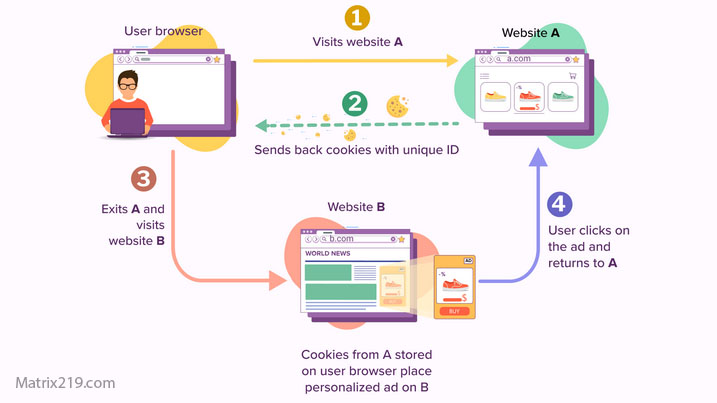
How Websites Track You
Simple Browser Privacy Steps
Browsers are an easy place to start. Using privacy-friendly browsers or adjusting built-in settings can immediately reduce tracking.
Beginners should focus on disabling third-party cookies, limiting extensions, and avoiding unnecessary logins during casual browsing.
Basic App Privacy Awareness
Apps often request more permissions than needed. Beginners should review permissions during installation and remove access that does not make sense.
Uninstalling unused apps reduces background data collection and tracking risk.
App tracking methods are explained in more detail here: How Apps Track You
Account and Password Awareness
Accounts connect activity across platforms. Beginners should limit account creation and use strong, unique passwords.
Basic account security supports privacy by reducing exposure during breaches or compromises.
Understanding who handles account data helps clarify risks, as explained in: Who Collects Your Data Online
Privacy Habits That Are Easy to Maintain
Effective privacy habits should be sustainable. Beginners benefit most from simple routines rather than complex setups.
Regularly reviewing permissions, logging out of unused accounts, and avoiding unnecessary services help maintain reduced exposure.
For practical steps beginners can follow, see: How to Stop Online Tracking
FAQ
Is online privacy difficult for beginners?
No. Starting with small changes makes privacy manageable and effective.
Do beginners need special privacy tools?
Not necessarily. Many improvements come from better settings and habits.
Is free software always bad for privacy?
Not always, but many free services rely on data collection.
Can beginners protect privacy on smartphones?
Yes. Reviewing permissions and uninstalling unused apps helps significantly.
How long does it take to improve online privacy?
Basic improvements can be made in minutes, with benefits lasting long-term.