Online Privacy Tools are often promoted as instant solutions to complex privacy problems. VPNs, ad blockers, privacy extensions, and secure browsers all promise protection, but their real-world effectiveness varies widely depending on how they are used and what threats they address.
Many users install multiple tools expecting complete privacy, only to discover that tracking and profiling still occur. Understanding what each tool actually does—and what it cannot do—is essential for building a realistic privacy setup.
This article explains the most common online privacy tools, how they work, and which ones genuinely reduce data exposure.
Quick Navigation
VPNs and Network Privacy
VPNs encrypt internet traffic and hide IP addresses from websites. This improves network privacy and protects against local network monitoring.
However, VPNs do not block tracking scripts, cookies, or fingerprinting. They address one layer of privacy but leave many others untouched.
To understand how tracking persists beyond IP addresses, see:
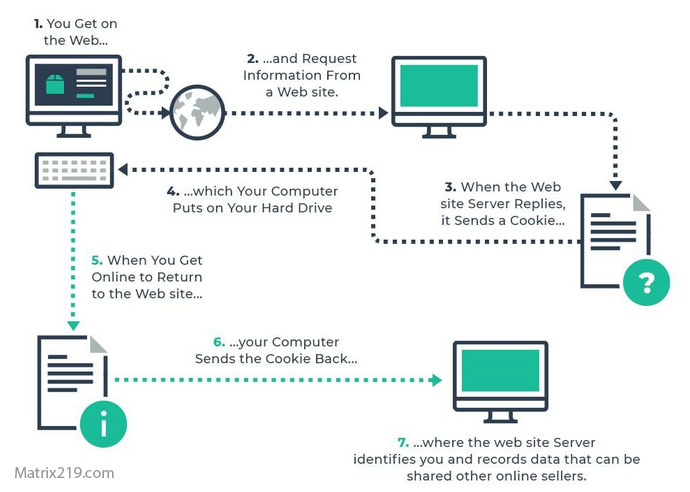
How Websites Track You
Ad Blockers and Tracker Blockers
Ad blockers reduce exposure to third-party trackers by blocking known tracking domains. This significantly reduces cross-site tracking and intrusive advertising.
While effective against many trackers, blockers do not stop account-based tracking or fingerprinting techniques.
For broader context, review:
Digital Privacy and Online Tracking: How You’re Tracked Online and How to Protect Yourself
Browser Extensions and Fingerprinting
Some extensions attempt to limit fingerprinting by blocking scripts or randomizing signals. While helpful, excessive extensions can increase fingerprint uniqueness.
Choosing a small number of trusted extensions is more effective than installing many tools with overlapping functions.
Fingerprinting techniques are explained in detail here:
Browser Fingerprinting Explained
Browser Fingerprinting Explained
Secure Browsers and Built-In Protections
Privacy-focused browsers integrate protections such as tracker blocking and cookie isolation. These built-in features are often more reliable than extensions alone.
However, browser choice does not eliminate tracking by logged-in accounts or mobile apps.
To understand app-level tracking limits, see:
How Apps Track You
Email and Communication Privacy Tools
Some email clients block tracking pixels by default. Encrypted messaging tools protect message content but do not necessarily hide metadata.
These tools improve specific privacy aspects but should not be confused with full anonymity.
What Privacy Tools Cannot Do
No privacy tool can fully eliminate tracking. Tools reduce exposure but cannot control how platforms collect data once users log into accounts or share information.
Understanding these limits prevents false confidence and overreliance on single solutions.
For practical reduction strategies beyond tools, see:
How to Stop Online Tracking
Building a Balanced Privacy Toolkit
Effective privacy protection combines a small number of tools with informed behavior. Layered approaches outperform single-tool solutions.
Selecting tools based on actual needs reduces complexity and improves usability.
FAQ
Do privacy tools stop all tracking?
No. They reduce exposure but do not eliminate tracking entirely.
Is using multiple privacy tools better?
Not always. Too many tools can conflict or increase fingerprinting risk.
Are free privacy tools trustworthy?
Some are, but funding models should be reviewed carefully.
Do privacy tools affect website functionality?
Some tools may break site features and require adjustments.
Should beginners use privacy tools?
Yes, but starting with basic tools and habits is best.