
Digital Privacy for Seniors matters because many online services are not designed with older users in mind. Seniors often face unique privacy risks, including aggressive tracking, misleading interfaces, and targeted scams that exploit unfamiliarity with digital systems.
At the same time, seniors rely heavily on online tools for communication, healthcare, banking, and daily services. This makes practical, easy-to-follow privacy habits more important than complex technical solutions.
This article explains common privacy risks for seniors and outlines simple steps that help reduce exposure without adding unnecessary complexity.
Quick Navigation
Why Seniors Face Different Privacy Risks
Seniors may be less familiar with modern tracking methods and interface patterns designed to encourage data sharing. Consent pop-ups, default settings, and confusing permissions often favor platforms rather than users.
Because seniors frequently use essential services online, their data can become especially valuable for profiling and targeting.
To understand how tracking systems work in general, see: Digital Privacy and Online Tracking: How You’re Tracked Online and How to Protect Yourself
Common Privacy Challenges for Seniors
Many seniors keep accounts permanently logged in for convenience. This increases account-based tracking and long-term profiling.
Email newsletters, health portals, and social platforms may include hidden tracking elements. These tools often collect more data than expected.
Understanding how websites collect data helps clarify these risks, as explained in: How Websites Track You
Simple Browser Privacy Steps
Browsers are the easiest place to improve privacy. Seniors benefit from using browsers with built-in tracking protection and minimal configuration.
Avoid installing unnecessary extensions. Keeping browsers updated reduces both security and privacy risks.
Privacy-focused browsing habits reduce exposure without changing daily routines.
Email and Communication Awareness
Email is a common source of tracking and scams. Seniors should be cautious with unexpected messages and avoid opening unnecessary marketing emails.
Disabling automatic image loading in email clients reduces tracking from pixels embedded in messages.
Email tracking mechanisms are explained here: Email Tracking Explained
Managing Accounts and Passwords
Seniors often reuse passwords for convenience. This increases both security and privacy risks.
Using unique passwords and avoiding unnecessary account creation reduces exposure. Logging out of unused accounts also limits long-term tracking.
Understanding who collects account data helps guide decisions, as explained in: Who Collects Your Data Online
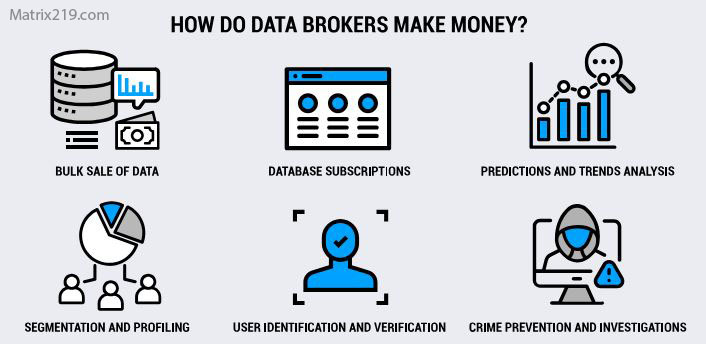
Data Brokers and Aggregators
Avoiding Privacy Exploitation and Scams
Many scams rely on collecting personal data through misleading messages or fake support requests. Seniors should be cautious with unsolicited calls, emails, or pop-ups requesting information.
Privacy awareness reduces the likelihood of falling for data-harvesting scams.
Keeping Privacy Simple and Sustainable
Privacy protection for seniors should focus on simplicity. A few consistent habits are more effective than complicated setups.
Regularly reviewing settings, avoiding unnecessary services, and asking for help when unsure helps maintain control.
For practical steps that work for all users, see: How to Stop Online Tracking
FAQ
Is online privacy harder for seniors?
It can be, but simple habits make a big difference.
Do seniors need special privacy tools?
Not necessarily. Built-in protections and awareness are often enough.
Are seniors targeted more for data collection?
They are often targeted through scams and misleading interfaces.
Should seniors avoid the internet?
No. Informed use is safer than avoidance.
How can family members help?
By helping review settings and explaining privacy choices clearly.