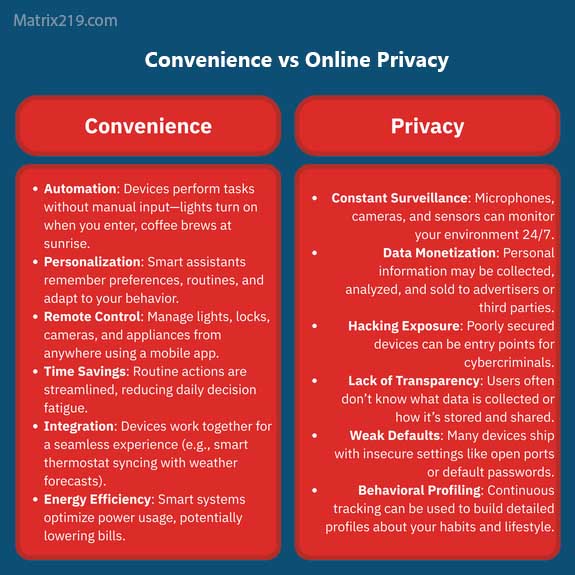
Online Privacy vs Convenience is a trade-off most people make every day without realizing it. Fast logins, personalized recommendations, saved passwords, location-based services, smart assistants, and synchronized devices make digital life easier. But many of these features depend on collecting, storing, and analyzing personal data. The important question is not whether convenience is bad. It is whether the amount of data being exchanged is reasonable for the benefit a feature provides. A five-second convenience may seem harmless, but hundreds of similar choices can create a detailed long-term profile of a user.
Modern privacy is therefore less about completely avoiding technology and more about understanding which conveniences require data, who receives that data, and whether the benefit is worth the exposure.This article explains the relationship between online privacy and convenience, the hidden costs of everyday digital features, and practical ways to keep useful services without unnecessarily giving up control of your personal information.
Quick Navigation
Why Convenience Drives Data Collection
Convenience usually depends on remembering something about the user. A website remembers your preferences, an app remembers your location, and an online service keeps you signed in so you do not have to authenticate every time, From the user’s perspective, this feels like a better experience. From the platform’s perspective, however, every saved preference and interaction can become another data point.
Personalization is a good example. A service needs information about previous behavior to recommend products, videos, articles, or search results. The more information it collects, the more accurately it can predict what a user might want next, This is one reason tracking has become deeply integrated into modern online services.
- To understand the wider tracking ecosystem, see: Digital Privacy and Online Tracking: How You’re Tracked Online and How to Protect Yourself
Common Convenience Features That Reduce Privacy
Many privacy trade-offs are hidden inside features that appear completely harmless. Users often enable them once and rarely reconsider the decision.
- Saved logins: Keep accounts connected across sessions and devices.
- Personalized recommendations: Depend on behavioral data and interaction history.
- Location services: Allow apps and websites to provide location-aware features.
- Automatic synchronization: Shares information across multiple devices.
- Voice assistants: May process voice commands and related usage data.
- Auto-fill: Stores information to make future forms faster.
- Single sign-on: Connects activity across multiple services through one identity.
None of these features is automatically harmful. The privacy cost depends on what information is collected, how long it is retained, and whether it is shared with other organizations. Website tracking provides an important part of this picture.
- See How Websites Track You to understand how cookies, browser storage, fingerprinting, and third-party trackers can identify visitors.
The Hidden Cost of Staying Logged In
Staying logged into an account is one of the easiest ways to improve convenience. It removes repeated authentication and allows services to synchronize preferences automatically. The privacy cost is that activity becomes easier to associate with a persistent identity. Searches, purchases, viewed content, device usage, and interactions can potentially be connected to the same account.
This becomes even more significant when the same account is used across phones, laptops, tablets, and other devices. Account-based identification is also one of the reasons switching browsers does not necessarily prevent tracking. Once an activity is connected to an account, the account itself can become the primary identifier.
- For a deeper explanation of how different devices can become connected, see Cross-Device Tracking Explained.
Personalization Comes With a Data Cost
Personalization can make digital services significantly more useful. A streaming service can recommend relevant content, an online store can remember previous purchases, and a news platform can prioritize topics that appear interesting, However, personalization requires information about previous behavior. The system needs to know what you viewed, clicked, searched for, purchased, or ignored.
Over time, these individual signals can become a behavioral profile. The privacy issue is not necessarily the existence of personalization. The more important questions are whether users understand the collection process and whether they have meaningful control over it. Advertising systems take this concept even further by using behavioral information to predict interests and target users across different websites and applications. Learn more in Ad Tracking Explained.
Smart Devices and the Convenience Trade-Off
Smart TVs, speakers, watches, home assistants, security systems, and other connected devices make everyday tasks easier. They can automate routines, provide notifications, and respond to commands without requiring traditional input, The trade-off is that connected devices often generate continuous telemetry. Information about device usage, interactions, network connections, and system activity can be transmitted to service providers.
Unlike traditional websites, these devices may collect information while users are not actively browsing, This expands the privacy discussion beyond browsers and computers. Tracking can now occur across phones, applications, connected devices, and other parts of everyday life.
- For more on tracking outside traditional websites, read Online Tracking Beyond Websites.
Automatic App Permissions and Convenience
Mobile apps often request permissions during installation or when a specific feature is first used. Granting access makes the application easier to use, but unnecessary permissions can increase the amount of information available to the app, Location, contacts, microphone, camera, photos, and background activity can all create additional privacy exposure depending on how an application uses them.
The problem is that users frequently grant permissions quickly because refusing them may appear to make the application less convenient. Reviewing permissions periodically creates a better balance. If an application no longer needs a permission, removing access can reduce unnecessary data collection without requiring the app to be deleted.
- For a deeper look at application-level tracking, see How Apps Track You: Permissions, Background Data, and Hidden Signals.
Browser Convenience vs Privacy
Modern browsers remember passwords, cookies, browsing preferences, payment information, extensions, and synchronization data. These features save time, but they also create additional information that can remain associated with a browser profile.
Browser fingerprinting introduces another layer. Websites can analyze characteristics such as browser configuration, operating system, screen resolution, language, and other technical signals to distinguish one browser environment from another, This means that deleting cookies does not necessarily reset every form of recognition.
- Understanding this distinction is important when evaluating privacy tools. Read Browser Fingerprinting Explained for a detailed explanation of how fingerprinting works.
Consent Pop-Ups Do Not Remove the Trade-Off
Cookie and consent banners are now common across the web. They give users choices about certain categories of data processing, but the presence of a consent banner does not automatically mean that a website is privacy-friendly. Some interfaces make accepting all tracking easier than reviewing individual options. Users may choose the fastest option simply because they want to access the page. This creates another privacy-versus-convenience decision: spend additional time reviewing settings or accept the default configuration.
- Understanding what these choices actually mean makes it easier to avoid automatic decisions. See Consent Pop-Ups and Privacy for more about what users may be agreeing to.
When Convenience Is Worth the Privacy Cost
Not every privacy trade-off should be avoided. Some data sharing provides genuine benefits. Navigation applications need location information to provide accurate directions. Banking applications need account information to function. Cloud synchronization requires data to move between devices. The goal is therefore not to reject every data-dependent feature. Instead, users should evaluate whether the benefit is proportional to the information being shared.
A useful way to think about the decision is to ask three questions:
- What information does this feature require?
- Who can access or process that information?
- Is the convenience important enough to justify the exposure?
This approach turns privacy into an informed decision rather than an all-or-nothing choice.
The Problem With Privacy Defaults
Most users do not manually configure every privacy setting. They simply accept the defaults provided by an operating system, browser, application, or website Defaults matter because they influence millions of decisions without requiring users to actively choose them, A convenient default may keep users logged in, enable synchronization, allow personalized recommendations, or activate data-sharing features. These settings can be useful, but they may also increase the amount of information collected.
Users who want better privacy should periodically review important defaults rather than assuming that the original configuration was designed around minimum data collection.
How Convenience Creates Long-Term Privacy Exposure
The biggest privacy cost is often not a single piece of information. It is the accumulation of many small signals over time, A location signal by itself may reveal very little. A purchase history may reveal more. Search behavior, application usage, browsing patterns, device identifiers, and account activity can reveal significantly more when combined. Data aggregation allows organizations to connect these signals into broader profiles. This is why seemingly insignificant choices can matter when repeated for months or years. The issue is cumulative exposure rather than one isolated data point.
- If you want to understand how organizations combine information from different sources, see Who Collects Your Data Online.
Privacy vs Convenience on Multiple Devices
Using several devices can make everyday life much easier. A user may start a task on a phone, continue it on a laptop, and finish it on a tablet. Synchronization makes this seamless, but it also creates stronger connections between devices.
Shared accounts, synchronized browsers, cloud services, application identifiers, and behavioral patterns can all contribute to cross-device recognition. For users who want more separation, different browser profiles and selective synchronization can reduce unnecessary correlation while preserving important functionality.
How to Reduce Privacy Loss Without Losing Usability
The most practical privacy strategy is selective reduction. Instead of disabling everything, users can identify the features that provide little value and turn those off first.
- Disable unnecessary app permissions.
- Review location access and restrict it when continuous access is unnecessary.
- Use separate browser profiles for different activities.
- Disable unnecessary synchronization features.
- Review account privacy settings periodically.
- Reject unnecessary tracking cookies when appropriate.
- Limit unnecessary third-party applications.
- Remove unused accounts and services.
- Use privacy-focused browser protections.
- Think carefully before connecting every device to the same account.
These changes do not eliminate tracking, but they can significantly reduce unnecessary exposure while preserving most of the convenience people actually need.
- For a broader practical checklist, see How to Stop Online Tracking.
Convenience, Privacy, and Digital Identity
The more services become connected to a persistent digital identity, the more valuable that identity becomes for personalization and profiling. A single account can connect activity across multiple services. Multiple devices can then become associated with that account, creating a much broader picture of behavior. This does not mean that every connected service is automatically dangerous. It means that convenience increases the importance of understanding how identity and data are connected.
- For users who want to minimize identification rather than simply reduce tracking, it is also useful to understand the difference between privacy and anonymity. See Can You Be Anonymous Online?.
What Happens When You Try to Remove Your Data
Another hidden problem with convenience is that data collected today may remain available long after the original feature is no longer being used. Deleting an account can remove information from one service, but copies may already exist in backups, analytics systems, or third-party databases. This makes prevention and limitation more practical than depending entirely on deletion after the fact.
- For a deeper explanation of what data removal can and cannot accomplish, see Removing Your Data Online.
Finding the Right Balance
Online privacy vs convenience is not a competition where one side must completely defeat the other. A more realistic approach is to identify which conveniences genuinely improve daily life and which ones provide little value while requiring extensive data collection.
Users can keep useful features while reducing unnecessary exposure by changing defaults, limiting permissions, separating activities, and reviewing account settings regularly. The best privacy strategy is usually sustainable. A complicated configuration that makes everyday technology frustrating is unlikely to remain in place for long. Small changes that users can maintain for years are often more valuable than extreme measures that are abandoned after a few days.
FAQ
Does convenience always reduce online privacy?
No. Some convenience features require little personal data, while others depend heavily on tracking and profiling. The privacy cost depends on the feature and how the collected information is used.
Is staying logged into accounts bad for privacy?
Not necessarily, but persistent logins make it easier to associate activity with a specific identity and can strengthen tracking across sessions and devices.
Can I use personalized services and still protect my privacy?
Yes. Users can keep useful personalization while limiting unnecessary permissions, disabling optional tracking, and reviewing privacy settings.
Do smart devices create privacy risks?
They can. Connected devices may collect usage, network, location, or interaction data, depending on the device and service.
Does disabling cookies solve the privacy problem?
No. Cookies are only one tracking mechanism. Fingerprinting, account-based tracking, device identifiers, and other techniques can continue operating.
Should I stop using convenient online services?
No. The goal is not to abandon convenience. It is to understand the data cost of each service and reduce unnecessary exposure.
What is the easiest way to improve privacy without losing convenience?
Start with unnecessary permissions, tracking settings, unused accounts, and excessive synchronization. These changes can reduce exposure without dramatically changing how you use the internet.
Is online privacy possible without giving up convenience?
Yes. Practical privacy is about finding a reasonable balance between functionality and data exposure rather than trying to eliminate every form of data collection.